Fixing imx93 boot error on new B2 rev
Last month, i just bought a new FRDM-iMX93 board :D to do some stuff on the Ethos-U65 of this SoC. As usual, i got some document of nxp to build the yocto images for it. However, it seems not correct this time :)))
After flash the prebuilt-yocto image from the Applications Processors of iMX (the LF6.6.36-2.1.0 BSP) the process seem to be hang right after the M33 check.
1
2
3
4
5
6
7
8
9
10
11
12
13
14
15
16
17
U-Boot SPL 2025.04 (May 28 2026 - 12:47:38 +0900)
PMIC: PCA9451A
PMIC: Over Drive Voltage Mode
DDR: 3733MTS
found DRAM 1GB DRAM matched
M33 prepare ok
Normal Boot
Trying to boot from BOOTROM
Boot Stage: Primary boot
image offset 0x8000, pagesize 0x200, ivt offset 0x0
Malloc buffer failed
Parse seco container failed -12
Load image from 0x0 by ROM_API
Can't support legacy image
Error: -1
SPL: failed to boot from all boot devices
### ERROR ### Please RESET the board ###
One thing is that, i have the same board in our company, this image works well with it. Im truly confusing about that, and after some checks, i just realize that, my board is a newer sillicon mask. The DRAM chip on board is different with the previous frdm-imx93 rev
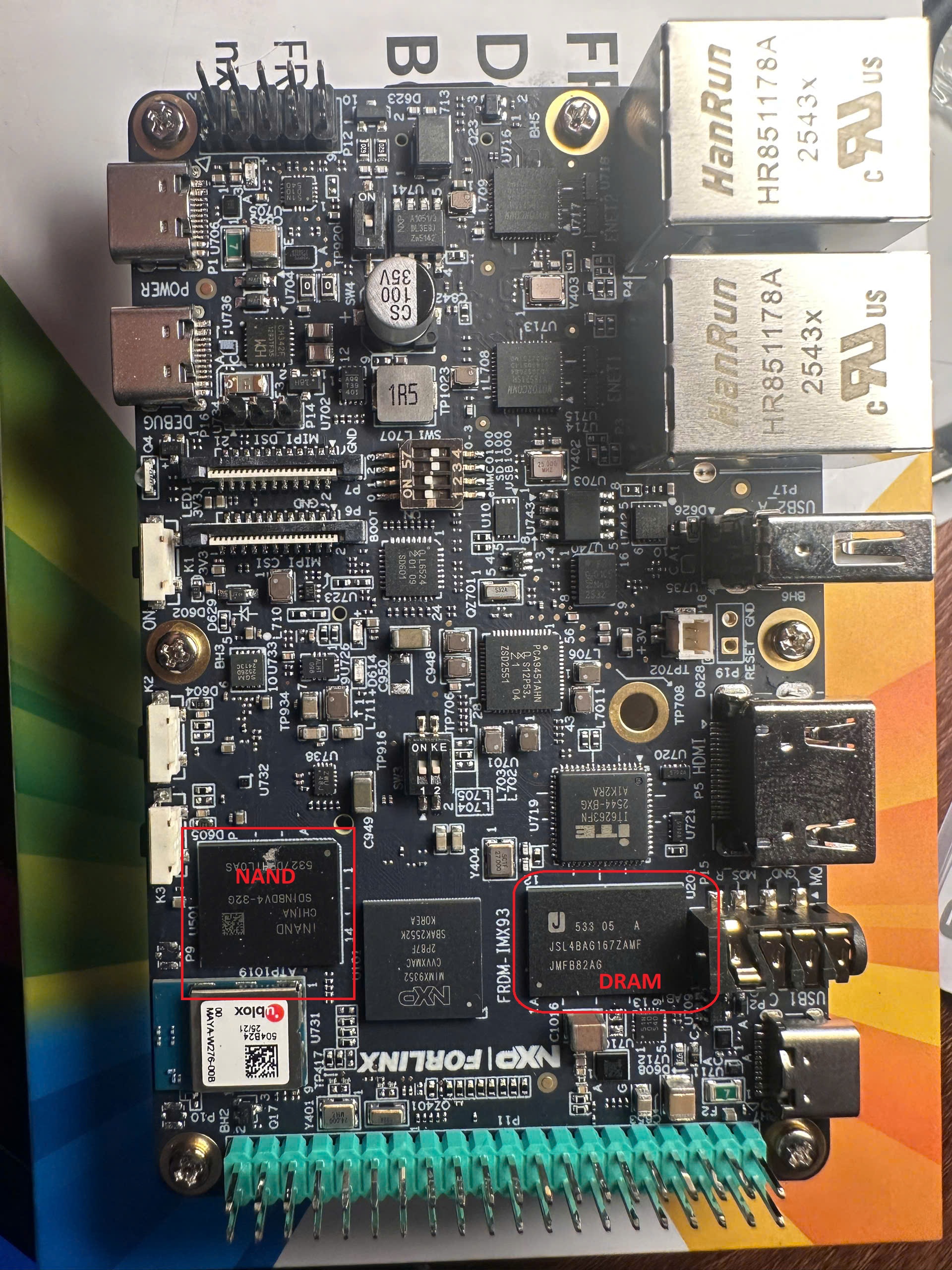
After knowing that my board is just the newer version, im wandering on the Community and tryin to find some solutions or patches available.
Root Cause: DDR Configuration Mismatch
After some investigation, i figured out the real issue. Looking at the factory eMMC image bootlog vs the public LF6.6.36-2.1.0 BSP, the key difference was obvious:
Factory eMMC (works fine):
1
2
3
4
5
DDR: 3733MTS
found DRAM 2CS_2GB DRAM matched ← DDR validation passed!
M33 prepare ok
Normal Boot
...
Public LF6.6.36-2.1.0 (hangs):
1
2
3
DDR: 3733MTS
M33 prepare ok
-- HANG --
The found DRAM ... DRAM matched line tells you that DDR training and validation succeeded. The public 6.6.36 BSP doesn’t print this at all, which means the DDR configuration in 6.6.36 doesn’t fit the substituted non-Micron LPDDR4X on the newer REV B2 boards. Instead, it hangs right after M33 setup, during the DDR validation phase.
Board spec vs reality:
- Schematic specifies: Micron MT53E1G16D1FW-046
- Actual chip fitted: JSL4BAG167ZAMF (JSC/non-Micron substitute)
This explains why the older company board (with Micron DDR) boots fine on 6.6.36, but my newer one doesn’t.
The Solution: Upgrade to LF6.18.2 (Whinlatter) BSP
The working factory image on my board uses LF6.18.2 (Whinlatter) BSP with an updated DDR configuration that handles both the original Micron memory and the newer JSL substitutes. Here’s how to build and flash it:
Step 1: Set up the LF6.18.2 BSP
1
2
3
4
mkdir imx-bsp-6.18.2 && cd imx-bsp-6.18.2
repo init -u https://github.com/nxp-imx/imx-manifest \
  -b imx-linux-whinlatter -m imx-6.18.2-1.0.0.xml
repo sync
Step 2: Configure for FRDM-IMX93
1
2
DISTRO=fsl-imx-xwayland MACHINE=imx93-11x11-lpddr4x-frdm \
  source sources/meta-imx/tools/imx-setup-release.sh -b build-frdm
Step 3: Build the image
1
bitbake imx-image-core
This will take a while depending on your hardware. Once done, you’ll have a .wic.zst file in the deploy directory.
Step 4: Boot and verify
After flashing, plug in the SD card and power on. You should now see:
1
2
3
4
5
6
DDR: 3733MTS
found DRAM 2CS_2GB DRAM matched (-> successful here)
M33 prepare ok
Normal Boot
...
NXP FRDM-IMX93 login:
## Reference