Quantization
Running neural networks on microcontrollers seems impossible at first - your typical CNN model might need hundreds of megabytes, but your MCU only has 32-256KB of RAM. That’s where quantization comes in. It’s basically the art of making big floating-point models small enough to actually run on real hardware.
Why We Need Quantization
Let’s start with the problem. A simple image classification network might have:
Original Model (Float32):
- 1 million parameters × 4 bytes = 4MB storage
- Intermediate activations: 512KB during inference
- Total: Way more than your typical MCU’s memory
After 8-bit Quantization:
- 1 million parameters × 1 byte = 1MB storage
- Intermediate activations: 128KB during inference
- Total: Still big, but much more manageable
After Aggressive Quantization (1-bit + 8-bit mixed):
- Core weights: 125KB (1-bit binary)
- Activations: 32KB (8-bit)
- Total: Fits in many modern MCUs!
The usual first step is 8-bit integer quantization, which gives about a 4x reduction for weights and activations compared with float32. More aggressive schemes, such as binary weights, can shrink selected tensors further, but the accuracy tradeoff is model-dependent and the MCU toolchain must support that quantization scheme.
How Quantization Actually Works
Instead of storing weights as 32-bit floats (-3.14159…), quantization maps them to smaller integer ranges.
8-bit Signed Quantization
The most common approach maps float values to signed 8-bit integers (-128 to +127):
1
2
3
4
5
6
7
// Quantization formula
int32_t q = (int32_t)roundf(float_value / scale + zero_point);
q = q < -128 ? -128 : (q > 127 ? 127 : q);
int8_t quantized = (int8_t)q;

// Dequantization (when needed)
float dequantized = (quantized - zero_point) * scale;
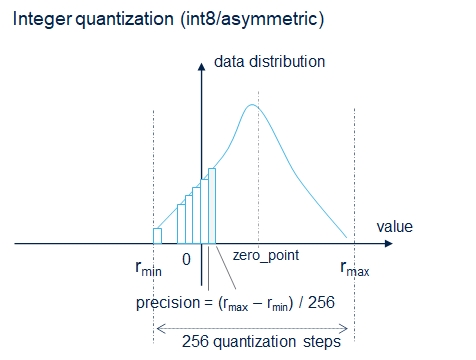
Example:
1
2
3
4
5
// Original weights: [0.1, -0.05, 0.24, -0.2, 0.15]
// Scale = 0.002, zero_point = 0

// Quantized: [50, -25, 120, -100, 75] (8-bit signed)
// Storage: 5 bytes instead of 20 bytes
Common Data Types
Most MCU frameworks support:
f32: 32-bit floating point (original)s8: 8-bit signed integer (-128 to +127)u8: 8-bit unsigned integer (0 to 255)
For small embedded targets, the most useful deployment path is usually integer-only inference: both weights and activations are stored and processed as integers. Some frameworks also support mixed models, but every float fallback costs extra memory and latency.
Performance Comparison
Here’s what you get with different quantization levels on a typical high-end MCU (400-500MHz Cortex-M7):
1
2
3
4
5
6
7
8
9
10
11
12
13
14
15
16
17
18
19
20
21
22
23
// Example model: Simple CNN for MNIST
// Original model: 60,000 parameters

typedef struct {
    uint32_t flash_kb;
    uint32_t ram_kb;
    uint32_t inference_ms;
    float accuracy;
} model_stats_t;

model_stats_t float32_model = {
    .flash_kb = 240,    // 60k params × 4 bytes
    .ram_kb = 86,       // Activation memory
    .inference_ms = 45, // Baseline timing
    .accuracy = 0.992
};

model_stats_t int8_model = {
    .flash_kb = 60,     // 60k params × 1 byte
    .ram_kb = 22,       // 4x smaller activations
    .inference_ms = 12, // 3.75x faster
    .accuracy = 0.989   // Minimal loss
};
Different Quantization Approaches
Post-Training Quantization (PTQ)
Take an already-trained float model and convert it:
1
2
3
4
5
6
7
converter = tf.lite.TFLiteConverter.from_saved_model(saved_model_dir)
converter.optimizations = [tf.lite.Optimize.DEFAULT]
converter.representative_dataset = representative_dataset_gen
converter.target_spec.supported_ops = [tf.lite.OpsSet.TFLITE_BUILTINS_INT8]
converter.inference_input_type = tf.int8
converter.inference_output_type = tf.int8
quant_model = converter.convert()
Pros: Easy to apply to existing models
Cons: Can lose significant accuracy
Quantization-Aware Training (QAT)
Train the model with quantization in mind from the start:
1
2
# TensorFlow Model Optimization Toolkit example shape:
# annotate/apply quantization during training, then export to TFLite int8.
Pros: Better accuracy retention
Cons: Need to retrain your model, take more time
For MCU deployment, PTQ normally needs a representative calibration dataset so the converter can estimate activation ranges. Without calibration, some tools only quantize weights, which reduces file size but may still require floating-point computation during inference.
Per-Tensor vs Per-Channel Quantization
Per-tensor quantization uses one scale and zero_point for the whole tensor. Per-channel quantization uses separate parameters per output channel or filter, which usually improves convolution weight accuracy with little runtime overhead.
In many int8 deployment flows, weights are symmetric and often per-channel, while activations are per-tensor and may be asymmetric. This matters because optimized MCU kernels are usually written for a small set of weight/activation schemes.
MCU-Specific Optimizations
Optimized Kernel Operations
Modern MCU AI frameworks generate highly optimized C kernels for specific data type combinations:
1
2
3
4
5
6
7
8
9
10
11
12
// Binary convolution kernel (1-bit × 1-bit -> 1-bit)
// Uses ARM SXTAB16, USAD8 instructions for efficiency on Cortex-M
void conv2d_binary_kernel(
    const uint32_t *input,     // Packed binary input
    const uint32_t *weights,   // Packed binary weights
    uint32_t *output,          // Packed binary output
    const conv_params_t *params
) {
    // Highly optimized implementation
    // Uses packed bit operations/popcount-style accumulation
    // instead of ordinary multiply-accumulate operations.
}
Memory Layout Optimizations
Channel Alignment: Most 32-bit MCUs work best when channels are multiples of 32:
1
2
3
4
5
6
7
8
// Recommended: 32, 64, 96, 128 channels
// Each 32 channels = 1 word for binary data

#define CHANNELS 64  // Good
// #define CHANNELS 30  // Wasteful (needs padding)

// Binary tensor storage
uint32_t activations[HEIGHT * WIDTH * CHANNELS/32];
Practical Example: Quantized Image Classifier
Let’s build a complete quantized model for MNIST digit recognition:
Generated MCU Code Usage
Example using a generic AI framework API:
1
2
3
4
5
6
7
8
9
10
11
12
13
14
15
16
17
18
19
20
21
22
23
24
25
26
27
28
29
30
31
32
#include "mcu_ai_framework.h"
#include "mnist_model.h"

// Initialize the AI model
model_handle_t network = NULL;
static uint8_t activations[MODEL_ACTIVATION_SIZE];
static uint8_t input_buffer[MODEL_INPUT_SIZE];
static uint8_t output_buffer[MODEL_OUTPUT_SIZE];

void run_inference(uint8_t* image_data) {
    // Copy input data
    memcpy(input_buffer, image_data, MODEL_INPUT_SIZE);

    // Run inference using the framework API
    int result = model_predict(network, input_buffer, output_buffer);

    if (result == 0) {
        // Process results
        int8_t* predictions = (int8_t*)output_buffer;
        int best_class = 0;
        int8_t best_score = predictions[0];

        for (int i = 1; i < 10; i++) {
            if (predictions[i] > best_score) {
                best_score = predictions[i];
                best_class = i;
            }
        }

        printf("Predicted digit: %d (confidence: %d)\n", best_class, best_score);
    }
}
Performance Analysis Tools
Model Analysis Tools
Most MCU AI frameworks provide analysis tools to understand your model’s performance:
Generic Analysis Example:
1
2
3
4
5
6
7
8
9
10
$ mcu-ai-tool analyze mnist_quantized.tflite

Model complexity analysis:
-------------------------
params #             : 45,386 items (177.29 KiB)
macc                 : 1,234,567
weights (ro)         : 8,456 B (8.26 KiB) / -168,988(-95.2%) vs float model
activations (rw)     : 12,288 B (12.00 KiB) (1 segment)
ram (total)          : 15,424 B (15.06 KiB) = 12,288 + 3,136 + 40
TensorFlow Lite Analysis:
1
2
3
4
5
6
$ tflite_convert --model_metrics_file=metrics.txt \
    --keras_model_file=mnist_quantized.h5

Model size: 8.5 KB
Inference time (estimated): 15.2 ms
Memory usage: 12.8 KB